![BidX-logo_white-2.png]](https://go.bidx.io/hs-fs/hubfs/BidX-logo_white-2.png?height=40&name=BidX-logo_white-2.png)
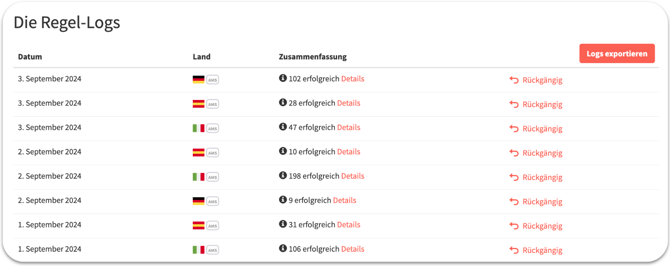 Under the “Management” tab, specifically in the “Automation & Rules” section, you will find the Adjustment Logs under your automations and individual rules. Clicking on “Details” will take you to the detailed logs. Here, all adjustments made by the system on that day are displayed. Manual changes or adjustments made by other systems are not included here.
BidX generally makes two different types of adjustments. The first is based on bid optimization and the second follows keyword management. Both are explained below.
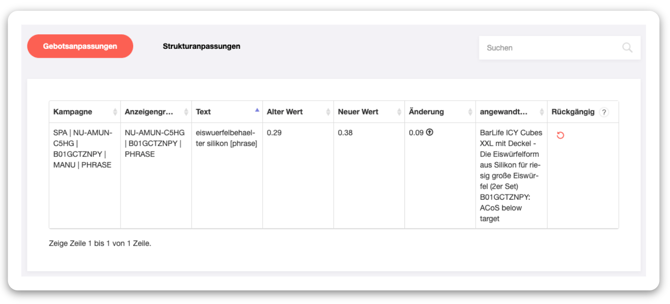
Bid adjustments are changes to the bids for individual keywords or ASINs that are made by automations or rules. The detailed view of the Adjustment Logs shows you the keyword affected, the associated campaign, the absolute bid change, and the rule or automation that triggered this adjustment.
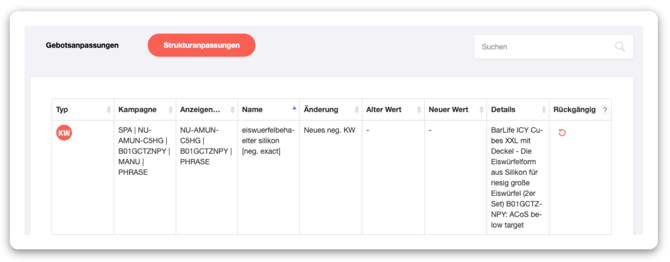
The Structure Adjustments tab displays the targets and negative targets created by the automation. This is the case, for example, when a keyword from an automatic campaign has been transferred to a manual campaign by keyword management. In the detailed view of the rule logs, you can then see in which campaign the keyword was created, what match type it is, and which automation or rule triggered this transfer.